Public Demo · Player handbook
Stormforge guides
Prepare at your base, explore your own world, and work toward the first boss. Choose the task you need next.
New after the opening? Start with the preparation loop →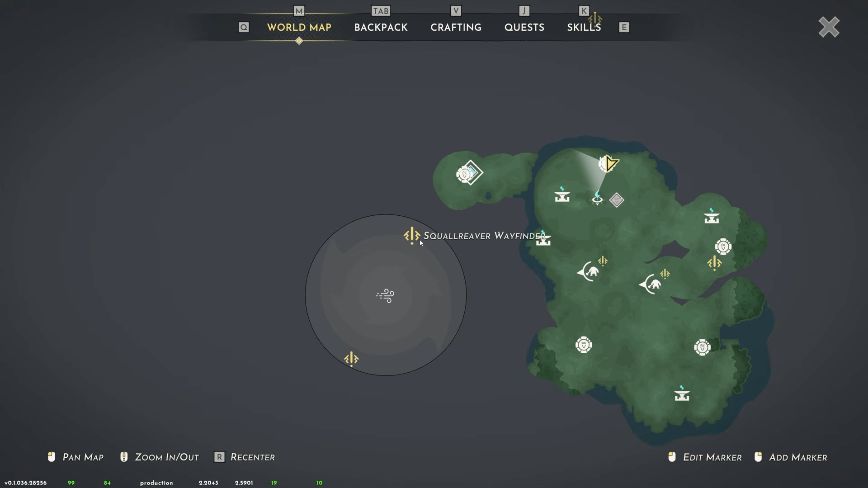
The first boss
Find and summon Squallreaver
Follow the Wayfinder, gather Corrupted Rock, make the Feast and use the altar. Map and interaction pictures show each stage.
Read the find & summon guide →Start and prepare
Build a repeatable preparation loop before a longer trip.
- 01↗
Your first preparation loop
A practical Stormforge checklist after the opening: set up a protected base, cook food, repair equipment and prepare for short exploration trips.
- 02↗
Cook food and check your food slots
Use a Grilled Potato Campfire recipe to read Food Size and recovery fields. Fix the difference between empty backpack space and available food slots.
- 03↗
Classes and growth in the Demo
The Stormforge Demo has Warrior, Ranger and Mage. See the Core skill tree, XP and level system, skill-point biome cap and Food Slot I example.
- 04↗
Read your map and plan a return route
Navigate Stormforge’s generated map, use named quest markers and identify Portal Fast Travel, Send Ping and Set Waypoint. Includes the current gliding-mode caveat.
Build, store and repair
Make the base useful between gathering and exploration trips.
- 01↗
Build and arrange your base
Read Stormforge’s build menu, station requirements and indoor conditions. Understand snapping, free placement and moving objects without guessing recipes.
- 02↗
Sort materials and craft from storage
Find Quick Stack in the backpack, understand matching-chest priority and keep crafting chests within your Crystal Pillar’s radius.
- 03↗
Repair weapons and equipment
Build a Repair Station from build mode, approach it and use Repair All Items. See the exact interaction and the No Items Need Repairing feedback.
Storms, shelter and the first boss
Gather corrupted materials, protect the base and open the Squallreaver fight.
- 01↗
Clear a storm and gather its materials
Find shield generators, expose the dark crystal and clear a Stormforge storm. Identify Corrupted Rock and the purple-veined rocks it comes from.
- 02↗
Protect your base from Chaos Storms
Place a Crystal Pillar at your base, return when a Chaos Storm warning appears and check the actual shield. Understand what Sheltered tells you.
- 03↗
Find and summon Squallreaver
Use the Wayfinder to find Squallreaver, craft a Feast at a Campfire and offer it at the altar. See the real map, recipe and summon prompt.
- 04↗
Co-op quest stuck at the Repair Station?
Use another player’s Repair Station for its quest objective, following developer guidance. See the interaction and the Crystal Pillar exception.
Demo and game information
Check playable scope, PC requirements and save-format boundaries.
- 01↗
What can you play now?
Get the free Steam Demo and compare its two biomes, three classes and first boss with Stormforge’s planned November 10, 2026 Early Access release.
- 02↗
Stormforge PC requirements
Official minimum and recommended Windows specs for Stormforge and its Demo, including CPU, GPU, 16 GB RAM, DirectX 11 and 5 GB available disk space.
- 03↗
Does your Demo save carry over?
The updated Stormforge Demo promises world and character carryover to Early Access. See how the October 7 new-save reset changes the answer for older saves.
For the current Demo
The latest official Demo version checked on October 25, 2026 was v0.1.036.28537. Worlds differ, and patches can change costs, balance and menus.