Public Demo · Food & recovery
Cook food and check your food slots
At a Campfire, select a normal meal, check its ingredients and Food Size, then craft it. Food capacity is separate from backpack space: if you cannot eat a meal, inspect its slot requirement and your available food slots.
Updated 2026-10-25
On this page
Cook a normal meal at the Campfire
Open the Campfire menu
Choose an ordinary food recipe. Grilled Potato is the example below; Squallreaver Feast has a separate boss-summoning purpose.
Read the recipe panel
Check the facility requirement and current ingredient amount. The example says Campfire or better.
Craft when the requirements are met
Use Craft for the selected meal. Choose food you have ingredients for and capacity to eat.
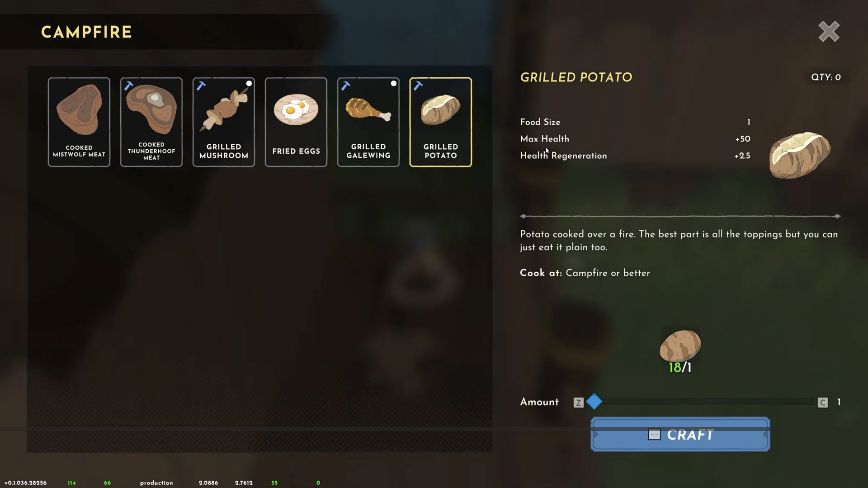
Select the picture to open the recipe larger. Follow the ingredient list in your current game rather than treating an older capture’s held quantity or recipe cost as universal.
Read Food Size and recovery separately
| Field | What to check |
|---|---|
| Food Size | The food-slot capacity the meal requires. |
| Max Health | The meal’s effect on maximum health. This is a different field from recovery. |
| Health Regeneration | The meal’s health-regeneration property; compare it when preparing for a trip. |
| Cook at | The facility required by the recipe, such as Campfire or better. |
Do not read every meal as an instant healing potion. Check the actual properties and active food state before relying on it for recovery.
Food balance changed in v0.1.036.28316; the notes say most foods now occupy one or two slots. The recipe picture predates that update, so its health values and slot cost are examples of the fields, not a current food-stat table.
“My backpack has space, but I cannot eat”
Backpack space and food slots are separate. In the developer’s food troubleshooting reply, the limiting factor is the room for active food, not the number of empty inventory cells.
- Inspect the meal’s item details and find its food-slot requirement.
- Check how much food capacity is currently available.
- Choose a meal that fits, or increase capacity through the relevant Core skill.
The developer’s September reply also says food was not spoiling at that time. A food-capacity problem should not be diagnosed solely from empty backpack cells or an old translation of the message.
Find the food-slot skill in Core
The Core skill tree includes Food Slot I. Its description says it unlocks an additional slot so you can eat larger meals and more food at once.
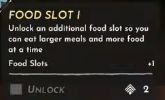
Check your current tree’s connected nodes and unlock requirements before spending points. The older menu’s displayed point cost is not a promise about every future build. See how XP, levels and skill points differ →
Before going back into a storm
- Prepare an ordinary meal whose food size fits your capacity.
- Read its recovery properties before depending on it in combat.
- Repair equipment while you are at the base.
- If your goal is summoning the boss, craft the separately named Squallreaver Feast as well.